> ## Documentation Index
> Fetch the complete documentation index at: https://docs.logictwelve.com/llms.txt
> Use this file to discover all available pages before exploring further.
# Usage
> Use Pocket Links day to day
Pocket Links has three sections in its sidebar: **Categories**, **Company Links**, and **Favorite Links**. The sidebar also links out to this documentation and to the [help portal](https://logictwelve.atlassian.net/servicedesk/customer/portal/40).
## Categories
Categories are containers for links. Each one has its own visibility setting and controls who can edit the links inside it. Every link has to belong to a category, so create at least one before saving links.
### Category cards
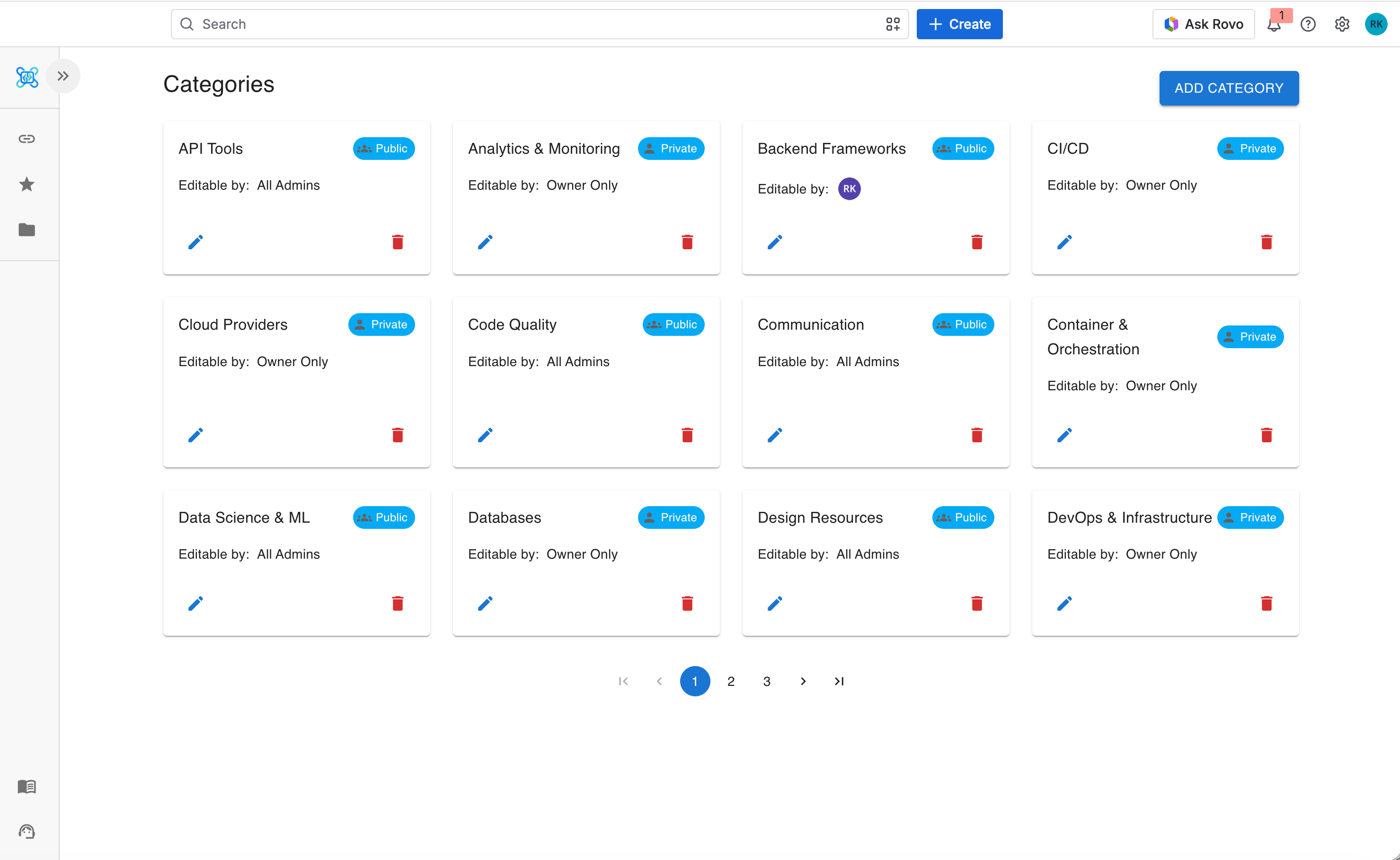
Each card on the Categories page shows:
* Category name
* A **Public** or **Private** visibility badge
* An **Editable By** badge for public categories
* Avatars of any specifically permitted users
* **Edit** and **Delete** buttons, if you have permission
 ### Adding a category
Click **Add Category** and fill in the form:
| Field | Required | Notes |
| ------------------ | ------------------------------------------ | ----------------------------------------------------------- |
| **Category Name** | Yes | Up to 50 characters |
| **Visibility** | Yes | **Private** or **Public** — see [Permissions](#permissions) |
| **Editable By** | Public only | **All Admins** or **Specific Users** |
| **Specific Users** | When **Editable By** is **Specific Users** | Search and select individual users |
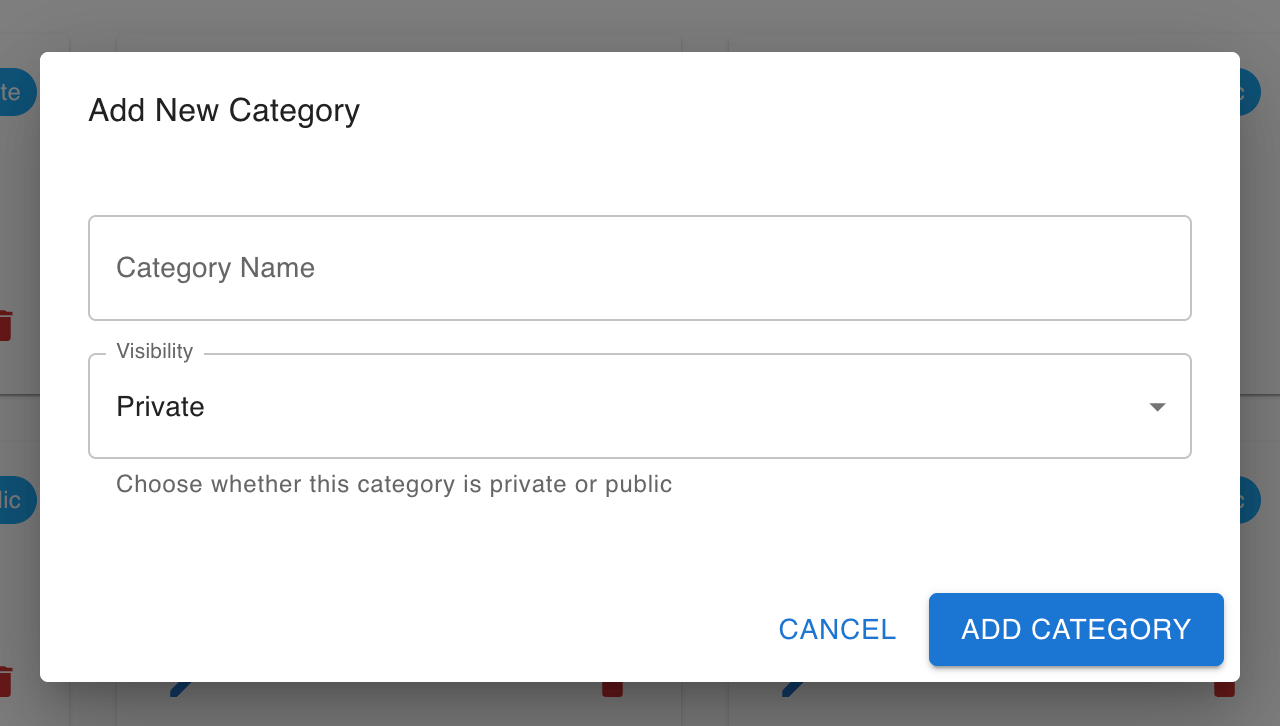
With **Visibility** set to **Private**, the form has no **Editable By** field:
### Adding a category
Click **Add Category** and fill in the form:
| Field | Required | Notes |
| ------------------ | ------------------------------------------ | ----------------------------------------------------------- |
| **Category Name** | Yes | Up to 50 characters |
| **Visibility** | Yes | **Private** or **Public** — see [Permissions](#permissions) |
| **Editable By** | Public only | **All Admins** or **Specific Users** |
| **Specific Users** | When **Editable By** is **Specific Users** | Search and select individual users |
With **Visibility** set to **Private**, the form has no **Editable By** field:
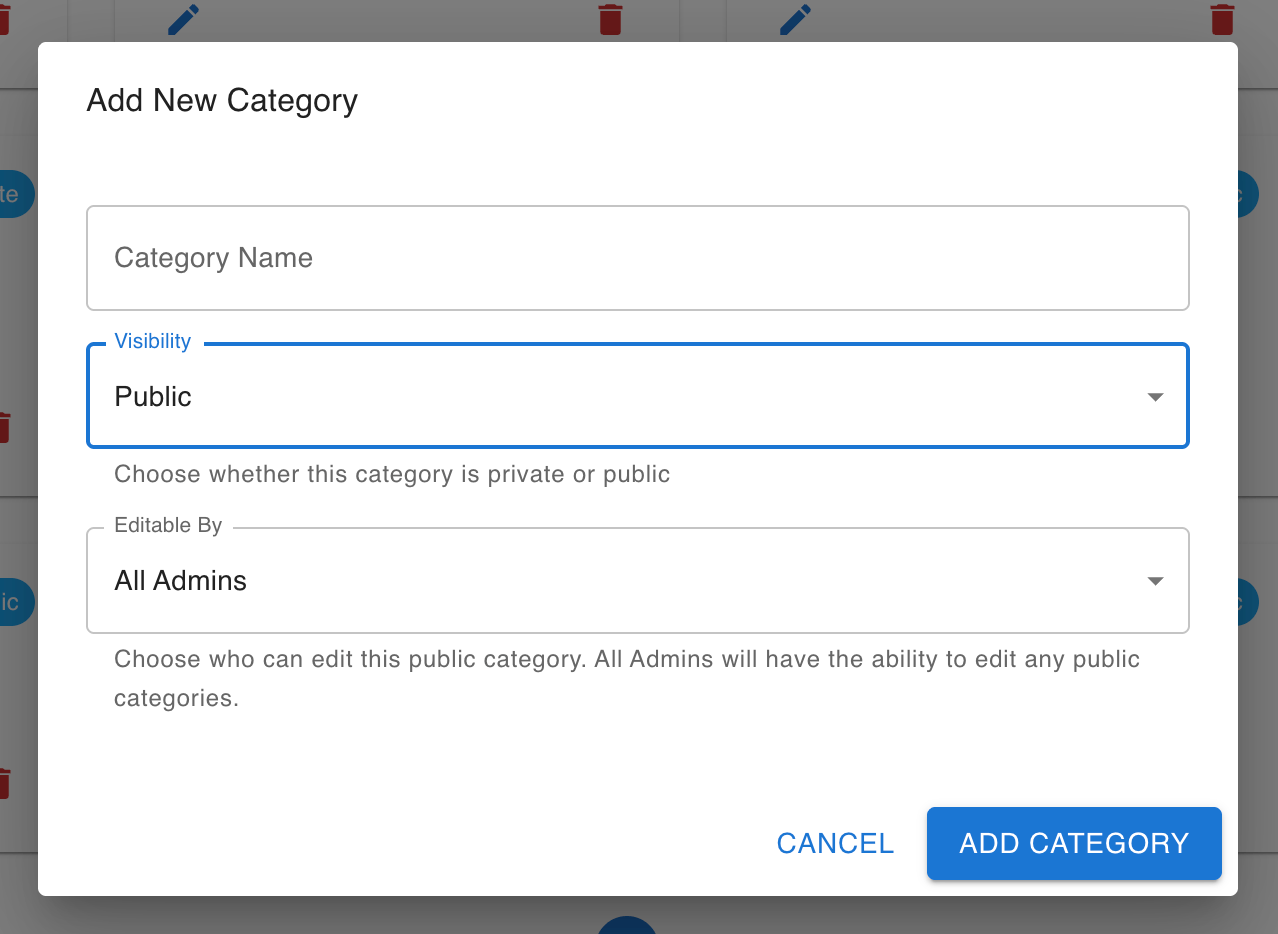
 With it set to **Public**, the **Editable By** field appears:
 If you close the form after entering data, Pocket Links asks you to confirm before discarding it.
### Editing a category
Click **Edit** on a category card to update its name, visibility, or edit permissions. Switching a category from **Public** to **Private** removes any specifically permitted users — only the owner and admins keep access afterward.
### Deleting a category
Click **Delete** on a category card and confirm. **This permanently deletes the category and every link inside it.**
## Company Links
### Browsing links
Links are grouped by category. Categories, and the links inside them, are listed alphabetically. Each link card shows:
* Link name and favicon
* A **VPN** badge, if the link requires a VPN connection
* An **SSO** badge, if the link requires single sign-on
* A star icon if the link is in your favorites
If you close the form after entering data, Pocket Links asks you to confirm before discarding it.
### Editing a category
Click **Edit** on a category card to update its name, visibility, or edit permissions. Switching a category from **Public** to **Private** removes any specifically permitted users — only the owner and admins keep access afterward.
### Deleting a category
Click **Delete** on a category card and confirm. **This permanently deletes the category and every link inside it.**
## Company Links
### Browsing links
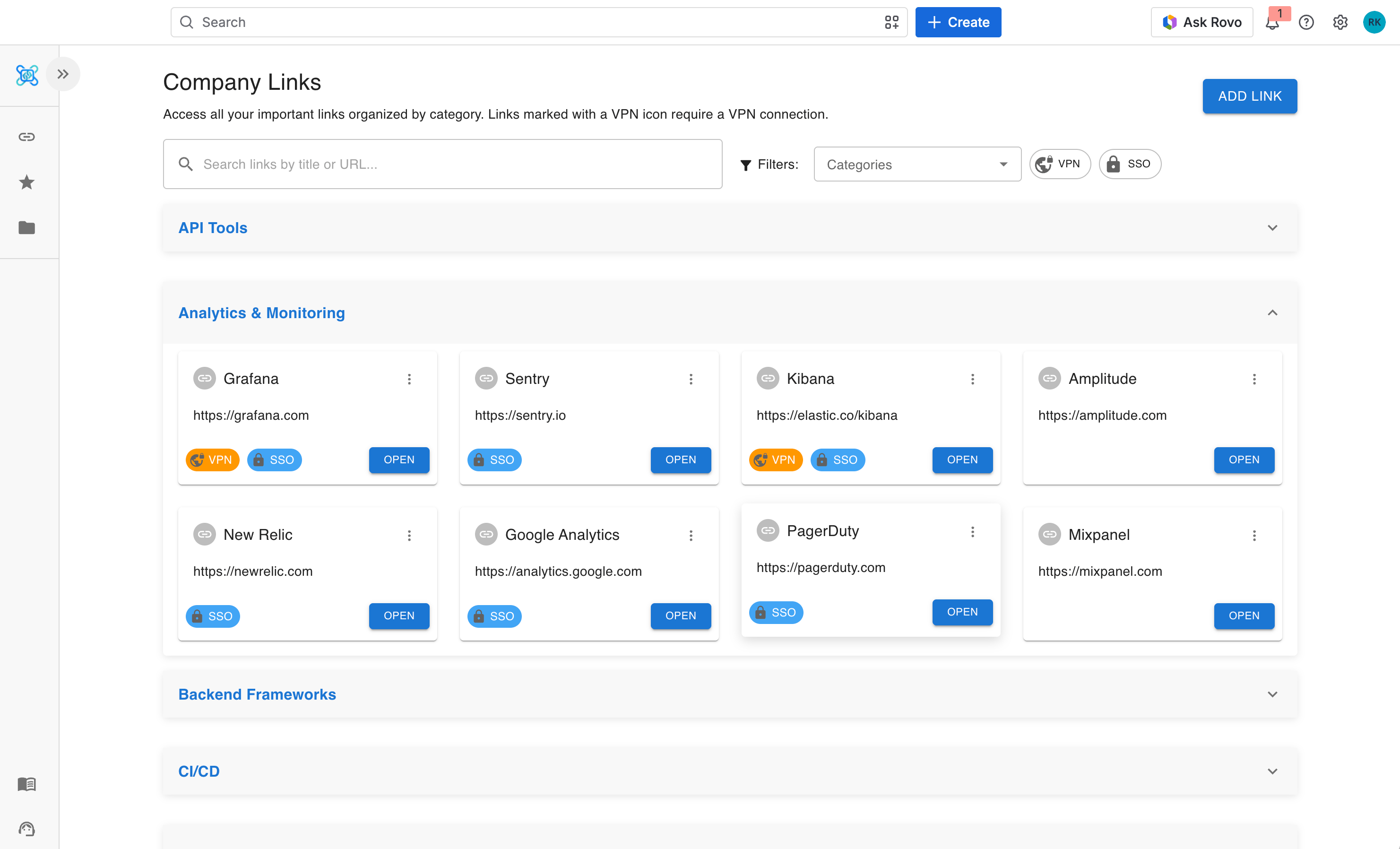
Links are grouped by category. Categories, and the links inside them, are listed alphabetically. Each link card shows:
* Link name and favicon
* A **VPN** badge, if the link requires a VPN connection
* An **SSO** badge, if the link requires single sign-on
* A star icon if the link is in your favorites
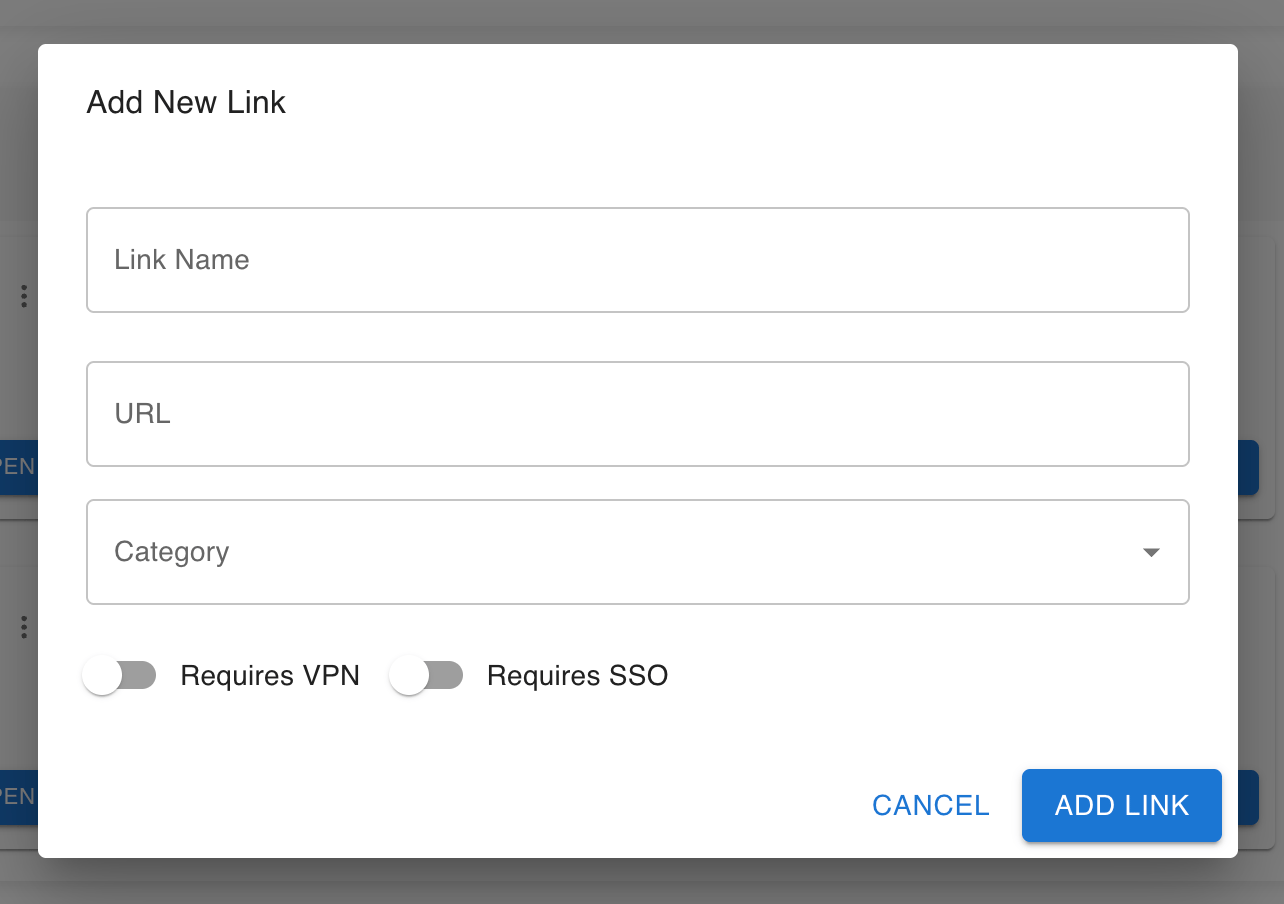
 ### Saving a link
Click **Add Link** in the top-right corner and fill in the form:
| Field | Required | Notes |
| ---------------- | -------- | ------------------------------------------------------------------------------------------------------------------ |
| **Link Name** | Yes | Up to 50 characters |
| **URL** | Yes | A valid `http://` or `https://` address, up to 2048 characters — see [URL validation rules](#url-validation-rules) |
| **Category** | Yes | Searchable dropdown of existing categories |
| **Requires VPN** | No | Turn on if the link only works over VPN |
| **Requires SSO** | No | Turn on if the link requires single sign-on |
The favicon is fetched automatically from the URL's domain.
### Saving a link
Click **Add Link** in the top-right corner and fill in the form:
| Field | Required | Notes |
| ---------------- | -------- | ------------------------------------------------------------------------------------------------------------------ |
| **Link Name** | Yes | Up to 50 characters |
| **URL** | Yes | A valid `http://` or `https://` address, up to 2048 characters — see [URL validation rules](#url-validation-rules) |
| **Category** | Yes | Searchable dropdown of existing categories |
| **Requires VPN** | No | Turn on if the link only works over VPN |
| **Requires SSO** | No | Turn on if the link requires single sign-on |
The favicon is fetched automatically from the URL's domain.
 If you close the form after entering data, Pocket Links asks you to confirm before discarding it.
### Editing and deleting a link
Open the **⋮** menu on a link card. **Edit** and **Delete** only appear if you have edit permissions for that link's category — see [Permissions](#permissions). Deleting a link asks for confirmation first.
### Searching and filtering
Use the controls at the top of the page to narrow the list:
* **Search box** — matches link names and URLs, with a short delay while you type
* **Category filter** — multi-select autocomplete across categories
* **VPN filter** — show only links that require VPN
* **SSO filter** — show only links that require SSO
* **Clear filters** — resets every active filter
Filters combine: picking a category and the VPN filter, for example, shows only VPN-required links in that category. Results are paginated, and filters persist across page changes.
### Starring a link
Open a link's **⋮** menu and choose **Add to Favorites** or **Remove from Favorites**. Favorites are personal — other users can't see what you've starred.
## Favorite Links
This page lists every link you've starred, grouped alphabetically by category. It supports the same **Search**, **Category**, **VPN**, and **SSO** filters as Company Links.
To remove a link from your favorites, open its **⋮** menu and choose **Remove from Favorites**.
## Permissions
### Visibility
| Setting | Who can see the category and its links |
| ----------- | --------------------------------------- |
| **Private** | Only the category owner and Jira admins |
| **Public** | Everyone with access to Pocket Links |
### Edit permissions
The owner and Jira admins can always edit or delete a category and its links, regardless of any other setting. For **public** categories, **Editable By** controls whether anyone else also gets edit access:
| Editable By | Who else can edit links |
| ------------------ | ---------------------------------------------------------------- |
| **All Admins** | No one beyond the owner and admins |
| **Specific Users** | A hand-picked list of users, in addition to the owner and admins |
Private categories don't have an **Editable By** option — only the owner and admins can edit or view them.
### What each role can do
| Action | Owner | Specific user (public category) | Admin | Other user |
| --------------------------- | ----- | ------------------------------- | ----- | ---------- |
| View public category links | ✓ | ✓ | ✓ | ✓ |
| View private category links | ✓ | — | ✓ | — |
| Add / edit / delete links | ✓ | ✓ | ✓ | — |
| Edit category settings | ✓ | — | ✓ | — |
| Delete category | ✓ | — | ✓ | — |
## URL validation rules
When adding or editing a link, the URL must:
* Start with `http://` or `https://`
* Contain a valid hostname (`http:///something`, with no host, is rejected)
* Not contain credentials (`http://user:pass@host` is rejected)
* Not contain spaces in the host part
## Tips
Use the **Category** filter on the Company Links page to narrow the list to a single team's links.
Turn on the **VPN** and **SSO** filters at the same time to find links that require both.
Star anything you visit regularly — your **Favorite Links** page is the fastest way back to it.
When creating a public category for a specific team, set **Editable By: Specific Users** and add only the people who should manage its links.
If you close the form after entering data, Pocket Links asks you to confirm before discarding it.
### Editing and deleting a link
Open the **⋮** menu on a link card. **Edit** and **Delete** only appear if you have edit permissions for that link's category — see [Permissions](#permissions). Deleting a link asks for confirmation first.
### Searching and filtering
Use the controls at the top of the page to narrow the list:
* **Search box** — matches link names and URLs, with a short delay while you type
* **Category filter** — multi-select autocomplete across categories
* **VPN filter** — show only links that require VPN
* **SSO filter** — show only links that require SSO
* **Clear filters** — resets every active filter
Filters combine: picking a category and the VPN filter, for example, shows only VPN-required links in that category. Results are paginated, and filters persist across page changes.
### Starring a link
Open a link's **⋮** menu and choose **Add to Favorites** or **Remove from Favorites**. Favorites are personal — other users can't see what you've starred.
## Favorite Links
This page lists every link you've starred, grouped alphabetically by category. It supports the same **Search**, **Category**, **VPN**, and **SSO** filters as Company Links.
To remove a link from your favorites, open its **⋮** menu and choose **Remove from Favorites**.
## Permissions
### Visibility
| Setting | Who can see the category and its links |
| ----------- | --------------------------------------- |
| **Private** | Only the category owner and Jira admins |
| **Public** | Everyone with access to Pocket Links |
### Edit permissions
The owner and Jira admins can always edit or delete a category and its links, regardless of any other setting. For **public** categories, **Editable By** controls whether anyone else also gets edit access:
| Editable By | Who else can edit links |
| ------------------ | ---------------------------------------------------------------- |
| **All Admins** | No one beyond the owner and admins |
| **Specific Users** | A hand-picked list of users, in addition to the owner and admins |
Private categories don't have an **Editable By** option — only the owner and admins can edit or view them.
### What each role can do
| Action | Owner | Specific user (public category) | Admin | Other user |
| --------------------------- | ----- | ------------------------------- | ----- | ---------- |
| View public category links | ✓ | ✓ | ✓ | ✓ |
| View private category links | ✓ | — | ✓ | — |
| Add / edit / delete links | ✓ | ✓ | ✓ | — |
| Edit category settings | ✓ | — | ✓ | — |
| Delete category | ✓ | — | ✓ | — |
## URL validation rules
When adding or editing a link, the URL must:
* Start with `http://` or `https://`
* Contain a valid hostname (`http:///something`, with no host, is rejected)
* Not contain credentials (`http://user:pass@host` is rejected)
* Not contain spaces in the host part
## Tips
Use the **Category** filter on the Company Links page to narrow the list to a single team's links.
Turn on the **VPN** and **SSO** filters at the same time to find links that require both.
Star anything you visit regularly — your **Favorite Links** page is the fastest way back to it.
When creating a public category for a specific team, set **Editable By: Specific Users** and add only the people who should manage its links.